



home, turning, wood, cad, contact, links, blog, disclaimer, about, site_map designed with Serif webplus, © copyright 2005 -





Join Polyline tool -
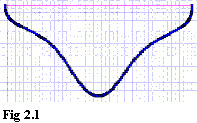
using join Polyline on a spline or bexier, converts it into lots of little Polylines, fig 2.1. i.e. toooo many nodes, which can give Genie a headache as she tries to work out what goes where., if you have to use join Polyline then try the convert to curves tool on a copy of the objects to see if its ok, often it will work ok, but sometimes yuk,
Tweaking
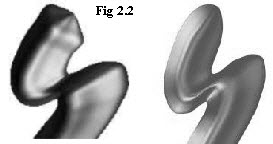
Tweaking of the profiles is nearly always needed after the first test loft, , As can be seen from the gray render Fig 2.2, I messed it up, this has a big bulge at the end. Mine’s around my waist but I’ll not go into that. -
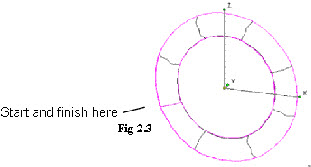
A note about start and finish profiles, the large ‘O’ Fig 2.3 is one loft, and normally one can click the same single profile to start and finish a closed loft, but occasionally TC will throw this up as an error, reason -

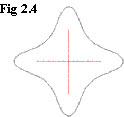
Full profile, closed Spline Fig 2.4
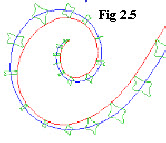
Each profile is N’ SEKE’d to the centre line (blue) Fig 2.5 and scaled down equally in both X and Y scale boxes, the red spline is just there as a guide to give an indication of how much to scale up / down
A few drawbacks to this method, are -
It can takes longer to loft a full profile if it has any complexity so the delays between loft / tweak / loft / tweak can become tedious and lead to errors,
The more complex a profile is, -
If one needs to alter some nodes its more difficult to alter both sides exactly the same

Problem -
Cause -
Solution -




| turning a to b |
| turning c |
| turning d to g |
| turning h to l |
| turning m to o |
| turning p to r |
| turning s |
| turning t to z |
| turbocad drawings |
| turbocad_vehicles |
| turbocad Gas |
| Turbocad Fun |
| tc_animations |
| tc_anaglyph |
| turbocad topics |
| turbocad program details |
| Woods |
| blog |
| disclaimer |
| about me |
| serif related |